Find your public link
Your OniLink card opens one link per card. Use a public LinkedIn profile, portfolio, website or a link page you can update later.
LinkedIn profile
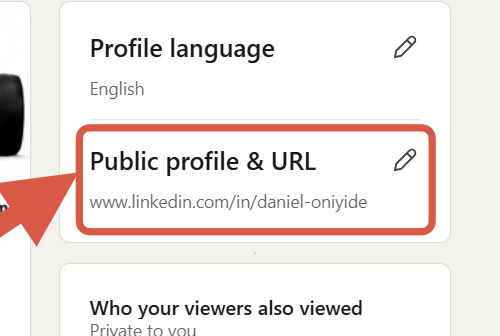
- On a computer, select Me → View profile. Copy your address from Public profile & URL on the right.
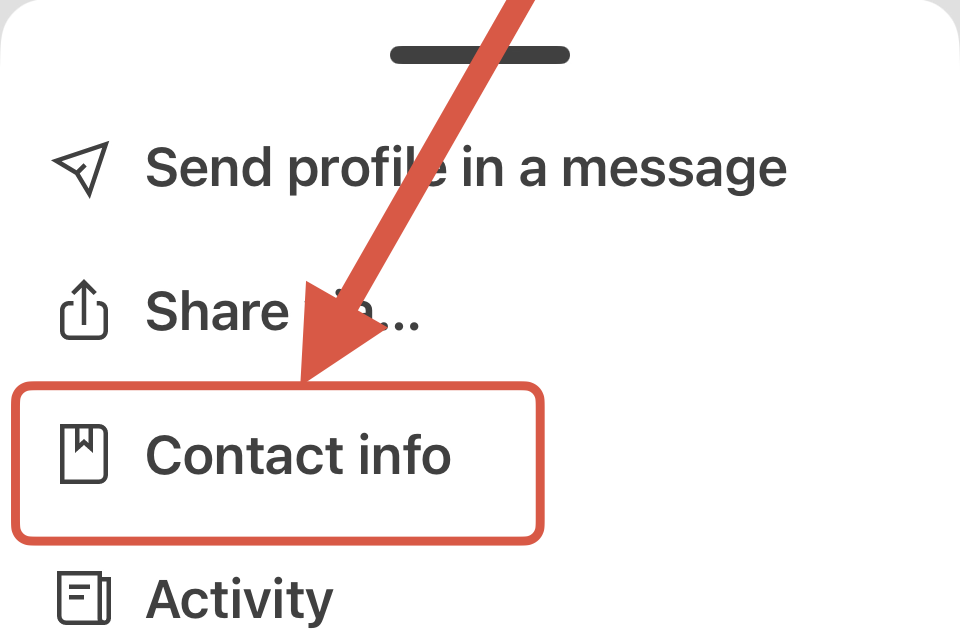
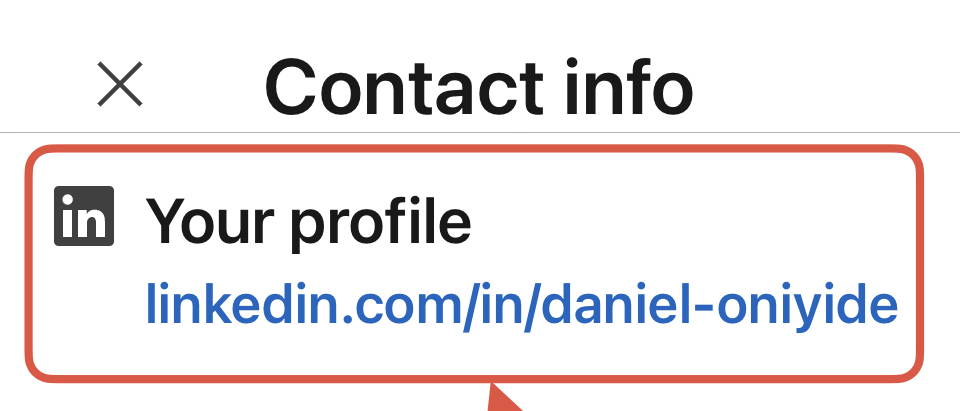
- In the LinkedIn app, tap your profile photo twice, tap the More icon, then choose Contact info. Copy the address under Your Profile.
- Check that the address looks like
https://www.linkedin.com/in/your-name/. If you can’t find it, check your public profile visibility. LinkedIn may still prompt visitors to sign in for some content.
If you switch these on, YouTube will receive device and playback information and may use browser storage to provide and measure the videos. Switch them off here at any time. Google privacy policy
Instagram profile
Open your profile in the Instagram app, select Share profile and tap Copy link. Your profile address follows the format https://www.instagram.com/yourusername/.
Snapchat profile
Tap your profile icon, open My Public Profile, and use the share option to copy your profile link. You can also use https://www.snapchat.com/add/yourusername with your actual Snapchat username.
TikTok profile
Open Profile, tap Share profile, then tap Copy link. To send people to your profile, use a link that opens your account page, such as https://www.tiktok.com/@yourusername.
Website, portfolio or shared file
- Open the exact page you want people to see, then copy the full address from the browser or use the platform’s Share → Copy link option.
- For a Google Doc or Drive file you want to share publicly, choose Share, set General access to Anyone with the link, choose Viewer, then select Copy link.
Use a destination you’re comfortable letting anyone with your card see.
Check and add your link
- Open a private or incognito window and paste the full link, including
https://. Check that it opens the page you want people to see. - Paste the link into Public link to open on tap on the order form. For two cards, enter one link in each card’s details. You can use the same link twice.
Use a public viewing link. Keep passwords, login codes and editing links out of the form. If you update a page later and keep its address, your card will still open it.
See what happens when someone taps
Hold the card near the phone’s NFC reader and follow the notification. This example opens a LinkedIn profile. A compatible phone and an internet connection are usually needed.